Your next compliance review shouldn’t start with a record hunt.
Find recorded gaps in care documentation, staff requirements and EVV. Track follow-up by owner, due date and status. Use AI to prepare drafts so staff can focus on checking the facts.
Your people stay in control: they verify facts, correct drafts, sign records and approve the next step.
Confirm the checks and connections available for your state and programs in the demo.
Connections your team can evaluate
Connect the systems behind your agency’s work.
Bring visit records, claim information, pharmacy messages and reviewed hours into the next workflow. Start from existing facts instead of retyping them; your team checks the source, approves the next step and reviews the response.
Stedi
Claims · Explicit human release
Prepare supported claims from reviewed service records.
Review supported non-EVV institutional claims, complete the required setup and evidence checks, and explicitly authorize release. Keep payer responses and claim-specific remittance details available for follow-up. Receipt, acceptance and payment remain separate outcomes.
QuickBooks · Reviewed-hours preparation
Map staff and prepare reviewed hours for the next step.
Use the configured QuickBooks connection to read the employee roster, review mappings and prepare a locked Regular Hours batch. The current workflow does not transmit payroll or run payments. Your existing payroll system and responsible people retain those decisions.
EVV · Program-specific setup
Move a reviewed visit to the required handoff.
The configured CareBridge workflow prepares visit files and records responses. Confirm your program, agency enrollment and required specification before relying on the connection.
Pharmacy HL7 intake · Staff verification
Prepare incoming order information for review.
Configured Del Mar Medical connections receive supported pharmacy messages and prepare medication-reconciliation drafts, giving staff incoming details to check instead of retyping them. Authorized staff resolve the person match and check the source before the appropriate order-activation process.
OpenAI · ChatGPT
MCP connection · Agency-authorized reads
Ask ChatGPT about the records you’re allowed to read.
Authorized agency administrators can connect an agency-approved ChatGPT account to look up permitted LunahUP records, with source links for review. Agency settings, permissions and required data agreements apply. This connection reads records; it cannot change or approve them, release claims or send a response. People take those actions in LunahUP.
Also evaluate Outlook records-request responses and screening-source imports in the connection guide.
A connection does not establish every state’s coverage, activate an order or prove acceptance or payment. Confirm the required source, human approval and response for your agency.
OpenAI and ChatGPT are trademarks of OpenAI. Other product names and logos belong to their respective owners.
The work behind the review
How many times does the same missing record return to your desk?
A missing record becomes another task for your team: find the details, contact the right person, ask for the information and check again.
A care note needing review.
A staff requirement without recorded evidence.
A visit with a missing punch.
Each unresolved item leaves a question on your desk: what is missing, who needs to act and what still needs checking?
Put the next review and follow-up step in view, so the work has somewhere to move forward.
From a flagged visit to a staff decision
Find the issue. Review the facts. Decide the next step.
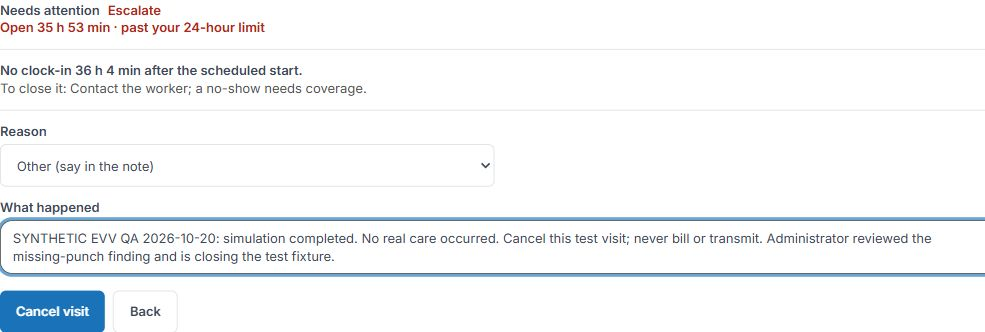
A missing EVV punch is one example of the record problems that return to your desk. Open the flagged visit and review its recorded details. Your authorized staff establish what happened and choose the appropriate action. The synthetic example below shows a saved cancellation and explanation.
01
See the exception
Find a visit marked for attention.
02
Open the visit details
Examine the recorded context.
03
Review the facts
Authorized staff determine the appropriate action.
A missing punch alone does not establish that care was missed. EVV connections and correction requirements depend on your state, payer and setup.
See the software at work
See the work your team would actually review.
Examine one saved synthetic EVV disposition +
Same test visit · Actual administrator interface
From a missing-punch finding to a saved test decision.
An existing test visit had no recorded clock-in and was marked for attention. The administrator workflow was used to document an Other reason and cancel the simulation. After a full reload, the same visit retained the cancelled status, explanation, account attribution and time. The test worklist’s attention count fell from eight to seven.
This was assistant-operated synthetic QA through the administrator account. It demonstrates a recorded test disposition, not real-care correction, independent clinical verification, supervisor approval or payer transmission. The fixture remained Test only · never sent.
These are unaltered browser captures, framed to exclude agency, staff and home identifiers. The application’s retained actor and time were inspected privately. Cancellation resolves this test finding; it does not establish that care occurred or that an agency is compliant.
EVV
A decision you can revisit
The synthetic example above starts with a missing-clock-in finding and ends with a saved cancellation and explanation. Reloading the same record preserved the result.
Demonstration scope: synthetic cancellation, not corrected care time or billing approval.
Care notes
See the human check
In the tested sample draft, AI flagged missing information and required staff confirmation before prepared wording could be applied. Your staff supply the facts and check the proposed wording.
Demonstration scope: sample-note preparation and staff confirmation.
Follow-up
Know who owns the next recorded step
Review the owner, due date and status recorded in the corrective-action tracker. Start the next conversation with the recorded responsibility and deadline in view.
Demonstration scope: action tracking, shown separately from the EVV example.
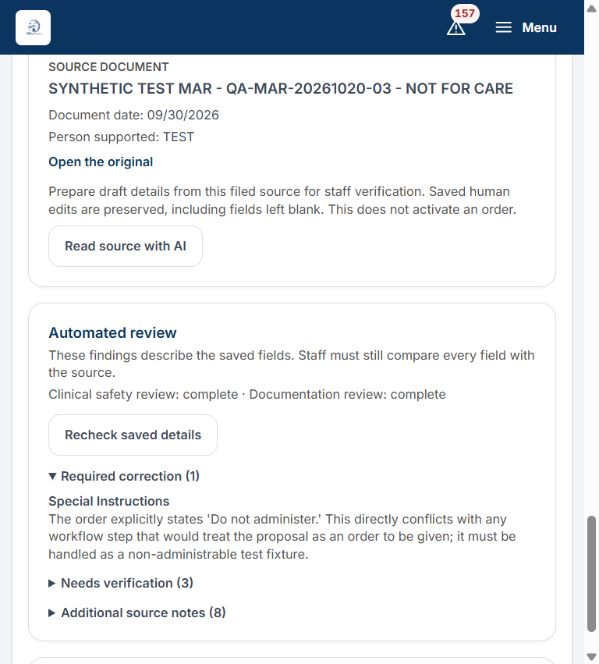
Medication-document review · Actual software · Synthetic data
A supporting example of human review. This fictional medication document remains a test fixture. The screen shows findings for staff verification, not clinical approval or a completed compliance loop.Examine the full screen ↗
Your people verify the facts and approve consequential actions.
Configured checks, usable source links and supported connections vary by workflow and agency setup.
Support the people doing the work
Less rebuilding. More attention to the work that needs you.
Care documentation
Start from your care facts
AI can organize entered or dictated facts into proposed note wording. Review and correct that draft instead of starting each sentence again. Your staff remain responsible for the facts and the signed record.
Staff requirements
Start staff follow-up with the missing item
See recorded evidence gaps against configured personnel requirements. Give HR a specific item to investigate and a concrete starting point for requesting the evidence still needed.
EVV
Investigate the visit with context
Open an EVV exception and its recorded details. Give the supervisor a specific visit to investigate while staff establish what happened and decide the appropriate action.
Corrective actions
Keep the next step and its owner in view
See a corrective action’s recorded owner, due date and status together. Use that record to check what remains open and discuss the next step with the responsible person.
LunahUP AI
Get preparation help. Keep the decision.
Use AI to prepare proposed note wording from the facts staff provide, giving them a draft to check and correct. Staff confirm missing information before prepared wording can be applied. Your agency’s permissions and settings govern access.
For agencies nationwide
Will this fit your agency’s programs and systems?
Discuss your service lines, state requirements and existing systems in the demo. Confirm the supported checks and connections before planning a trial.
Will LunahUP support our programs?
We serve IDD and HCBS agencies nationwide. Confirm the checks and connections available for your service lines, state requirements and existing systems before planning a trial.
Who controls AI-assisted work?
Authorized staff verify facts, correct drafts, sign records and approve consequential actions. AI output needs human review.
What happens to our existing records?
Agree which records can move, who will do the work and how they will be checked. Migration scope and any associated costs are separately agreed. The $0 setup fee covers system initialization.
What will staff need to learn?
Identify who will enter information, review work and approve records. Confirm access, training and responsibilities as part of your trial plan.
Put the software to work on a recurring task
Try it on the work that keeps coming back.
Use the 30-day free evaluation to assess one supported workflow. First, agree the trial scope and record how your team handles the task today: searching, entering information, correcting records and getting approvals.
Then compare the same task in LunahUP. See where the software helps, which decisions stay with your team and whether the process fits your agency. Make the next decision from what you observe.




 OpenAI · ChatGPT